You can recently create rounding rules and apply them to rates in Fairways Debt.
Fairways Debt now also enables you to bulk apply rounding rules to your transactions with floating rates.
<standardLoan>
 <phases>
  <phase>
   <indexing>
    <index>
     <advanced>
      <interestRateComputation>
       <roundingRuleFractional>
        <precision> ... </precision>
        <rateRoundingMethod> ... </rateRoundingMethod>
       </roundingRuleFractional>
      </interestRateComputation>
     </advanced>
    </index>
   </indexing>
  </phase>
 </phases>
</standardLoan>
To apply a rounding rule to a transaction:
- Add the <roundingRuleFractional> tags in the <interestRateComputation> tags of the transaction.
<standardLoan>
 <phases>
  <phase>
   <indexing>
    <index>
     <advanced>
      <interestRateComputation>
       <roundingRuleFractional>
       </roundingRuleFractional>
      </interestRateComputation>
     </advanced>
    </index>
   </indexing>
  </phase>
 </phases>
</standardLoan>
- Add the <precision> tags in the <roundingRuleFractional> tags.
<standardLoan>
 <phases>
  <phase>
   <indexing>
    <index>
     <advanced>
      <interestRateComputation>
       <roundingRuleFractional>
        <precision></precision>
       </roundingRuleFractional>
      </interestRateComputation>
     </advanced>
    </index>
   </indexing>
  </phase>
 </phases>
</standardLoan>
- Enter the precision, i.e. the denominator in the fraction 1/N.
Note: The maximum precision is 10.000.000.
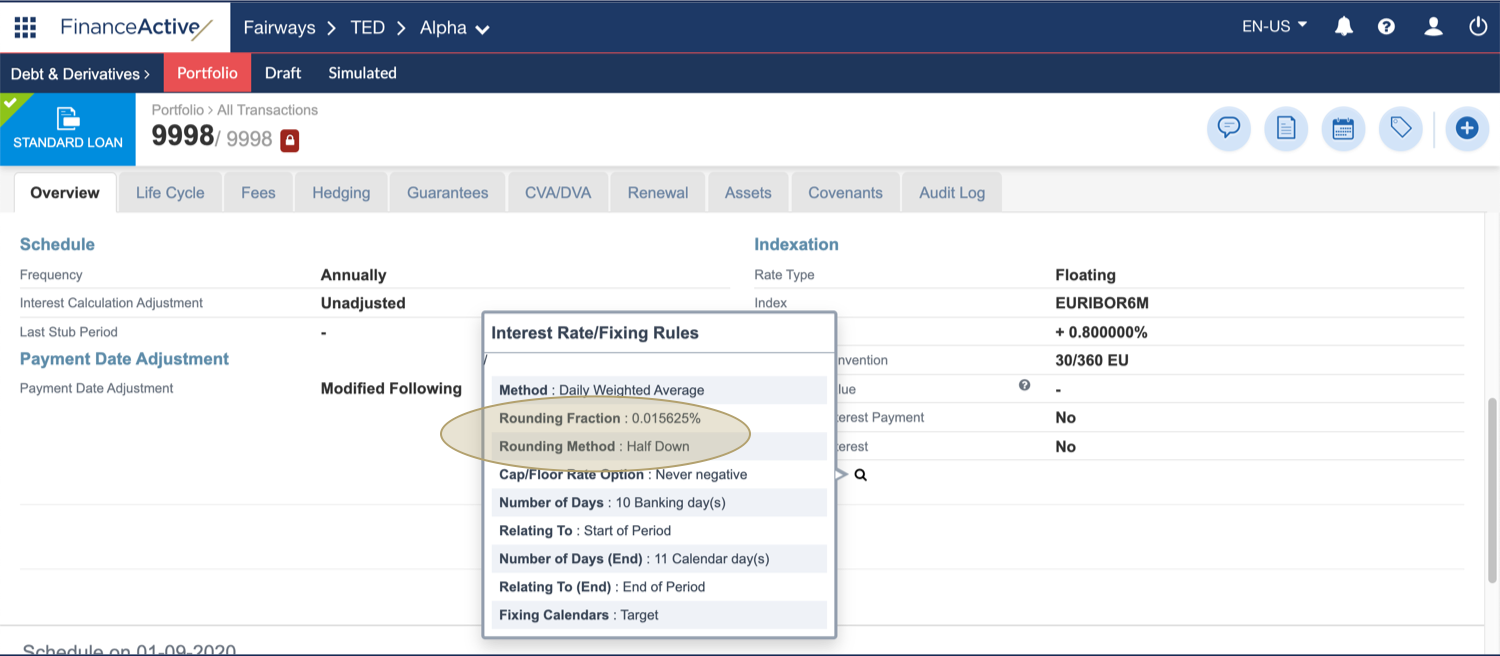
In this example, we enter a precision of 64.
<standardLoan>
 <phases>
  <phase>
   <indexing>
    <index>
     <advanced>
      <interestRateComputation>
       <roundingRuleFractional>
        <precision>64</precision>
       </roundingRuleFractional>
      </interestRateComputation>
     </advanced>
    </index>
   </indexing>
  </phase>
 </phases>
</standardLoan>
- Add the <rateRoundingMethod> tags in the <roundingRuleFractional> tags.
<standardLoan>
 <phases>
  <phase>
   <indexing>
    <index>
     <advanced>
      <interestRateComputation>
       <roundingRuleFractional>
        <precision>64</precision>
        <rateRoundingMethod></rateRoundingMethod>
       </roundingRuleFractional>
      </interestRateComputation>
     </advanced>
    </index>
   </indexing>
  </phase>
 </phases>
</standardLoan>
- Enter a rounding method:
|
Rounding Method |
Content Name |
|---|---|
|
Nearest |
NEAREST |
|
Down |
DOWN |
|
Up |
UP |
|
Half down |
HALF_DOWN |
|
Half up |
HALF_UP |
In this example, we select the half down rounding method.
<standardLoan>
 <phases>
  <phase>
   <indexing>
    <index>
     <advanced>
      <interestRateComputation>
       <roundingRuleFractional>
        <precision>64</precision>
        <rateRoundingMethod>HALF_DOWN</rateRoundingMethod>
       </roundingRuleFractional>
      </interestRateComputation>
     </advanced>
    </index>
   </indexing>
  </phase>
 </phases>
</standardLoan>
The relevant fraction is automatically calculated using the entered precision, in this example 1/64 = 0,015625.
See Apply a Rounding Rule to Interest Rates for more details.