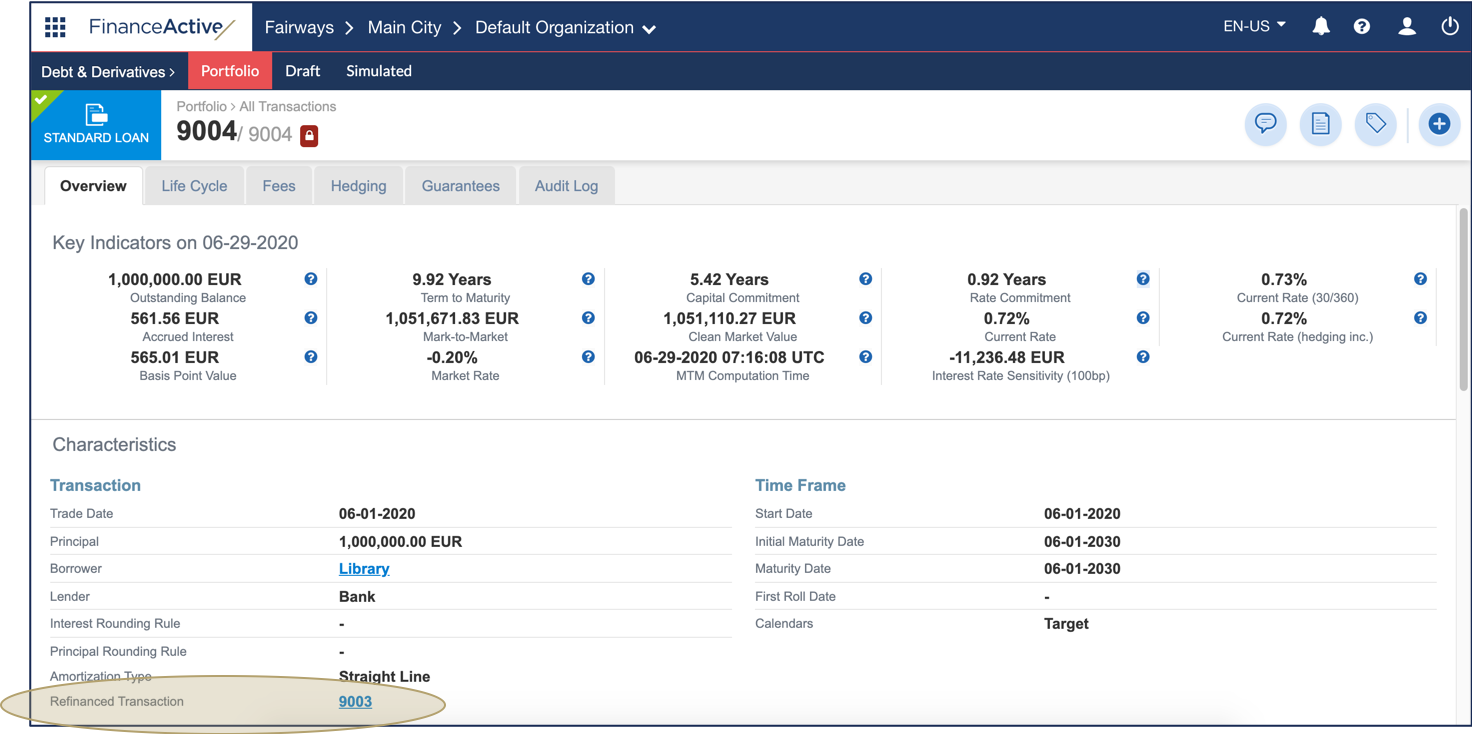
In Fairways Debt, you can refinance standard loans: fully repay the original transaction, which will be refinanced with a new one, for example with a better rate.
<standardLoan>
 <refinancing>
  <tradeDate> ... </tradeDate>
  <referenceDate> ... </referenceDate>
  <refinancedByReference> ... </refinancedByReference>
  <repaymentType> ... </repaymentType>
  <prepaymentPenalties> ... </prepaymentPenalties>
  <refinancePrepaymentPenalties> ... </refinancePrepaymentPenalties>
 </refinancing>
</standardLoan>
|
Tag |
Item |
Description |
|
|---|---|---|---|
|
refinancing |
Main |
Mandatory |
Rules to apply for refinancing a transaction. |
|
tradeDate |
Secondary |
Mandatory |
Date at which the transaction has been agreed for refinancing. |
|
referenceDate |
Secondary |
Mandatory |
New maturity date of the refinanced transaction. |
|
refinancedByReference |
Secondary |
Mandatory |
Reference of the refinancing transaction. |
|
repaymentType |
Secondary |
Mandatory |
Impacts how cash flow reports display. |
|
prepaymentPenalties |
Secondary |
Optional |
Amount of the fees paid for the repayment. |
|
refinancePrepaymentPenalties |
Secondary |
Optional |
Include/Exclude the penalties in/from the refinancing transaction. |
To refinance a transaction:
- Add the <refinancing> tags in the <standardLoan> tags of the refinanced transaction.
<standardLoan>
 <refinancing>
 </refinancing>
</standardLoan>
- Add the <tradeDate> tags in the <refinancing> tags.
- Enter the refinancing trade date in the YYYY-MM-DD format (year-month-day) in the <tradeDate> tags.
Note: The refinancing trade date must be equal or later than the trade date of the transaction to refinance.
In this example, we enter 2020-06-01, i.e. 1 June 2020.
<standardLoan>
 <refinancing>
  <tradeDate>2020-06-01</tradeDate>
 </refinancing>
</standardLoan>
- Add the <referenceDate> tags in the <refinancing> tags.
- Enter the reference date in the YYYY-MM-DD (year-month-day) format in the <referenceDate> tags.
Note: The reference date must be equal or later than the refinancing trade date.
In this example, we enter 2020-06-01, i.e. 1 June 2020.
<standardLoan>
 <refinancing>
  <tradeDate>2020-06-01</tradeDate>
  <referenceDate>2020-06-01</referenceDate>
 </refinancing>
</standardLoan>
- Add the <refinancedByReference> tags in the <refinancing> tags.
- Enter the reference of the refinancing transaction.
Note: In the interface, the refinancing transaction is automatically created based on the refinanced transaction. However, using XML, you must also create the refinancing transaction.
In this example, we enter 9004.
<standardLoan>
 <refinancing>
  <tradeDate>2020-06-01</tradeDate>
  <referenceDate>2020-06-01</referenceDate>
  <refinancedByReference>9004</refinancedByReference>
 </refinancing>
</standardLoan>
- Add the <repaymentType> tags in the <refinancing> tags.
- Enter a repayment type.
|
Repayment Type |
Content Name |
|---|---|
|
Full with cash flows: All movements display in cash flow reports, i.e. the repayment and penalty fee (if relevant) of the refinanced transaction and the new drawing of the refinancing transaction. |
REPAYMENT_FULL_WITH_CASH_FLOWS |
|
Full without cash flows: Only the last payment and the penalty fee (if relevant) of the refinanced transaction displays in cash flow reports. |
REPAYMENT_FULL_WITHOUT_CASH_FLOWS |
In this example, we enter REPAYMENT_FULL_WITH_CASH_FLOWS.
<standardLoan>
 <refinancing>
  <tradeDate>2020-06-01</tradeDate>
  <referenceDate>2020-06-01</referenceDate>
  <refinancedByReference>9004</refinancedByReference>
  <repaymentType>REPAYMENT_FULL_WITH_CASH_FLOWS</repaymentType>
 </refinancing>
</standardLoan>
- Add the <prepaymentPenalties> tags in the <refinancing> tags, if relevant.
- Enter the penalty amount.
Note: Use a full stop to separate units from decimals.
In this example, we enter 1000.50.
<standardLoan>
 <refinancing>
  <tradeDate>2020-06-01</tradeDate>
  <referenceDate>2020-06-01</referenceDate>
  <refinancedByReference>9004</refinancedByReference>
  <repaymentType>REPAYMENT_FULL_WITH_CASH_FLOWS</repaymentType>
  <prepaymentPenalties>1000.50</prepaymentPenalties>
 </refinancing>
</standardLoan>
- Add the <refinancePrepaymentPenalties> tags in the <refinancing> tags, if relevant.
- Enter:
- true to include the penalties in the refinancing transaction.
- false to exclude the penalties from the refinancing transaction.
Note: If the penalties are included in the refinancing transaction, then the penalty fee drawing displays in the cash flow reports, even for the type without cash flows.
In this example, we enter true.
<standardLoan>
 <refinancing>
  <tradeDate>2020-06-01</tradeDate>
  <referenceDate>2020-06-01</referenceDate>
  <refinancedByReference>9004</refinancedByReference>
  <repaymentType>REPAYMENT_FULL_WITH_CASH_FLOWS</repaymentType>
  <prepaymentPenalties>1000.50</prepaymentPenalties>
  <refinancePrepaymentPenalties>true</refinancePrepaymentPenalties>
 </refinancing>
</standardLoan>
The refinanced transaction matures with two life events: the repayment and the refinancing.
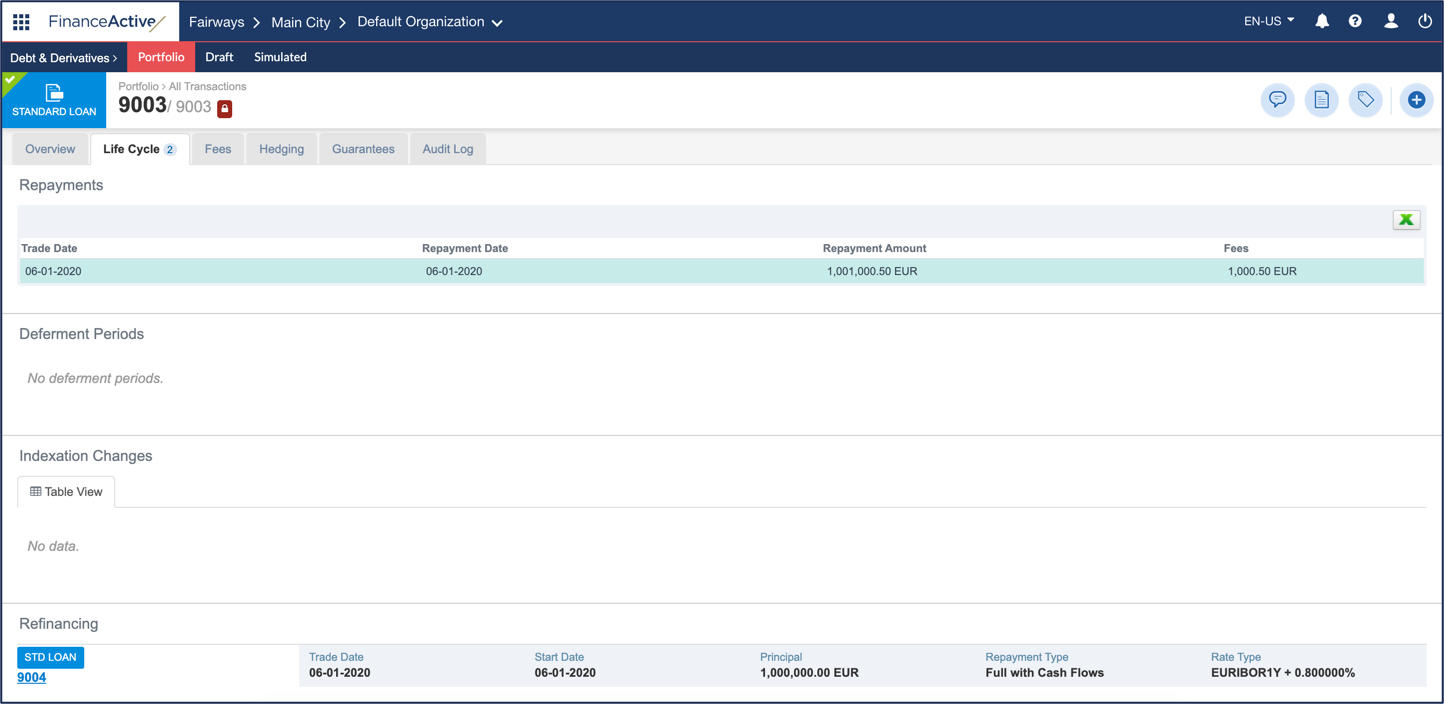
The refinancing transaction is associated with the refinanced transaction.